
Maybe you registered in your home constituency years ago, then moved to another town for work, school, or family. As an election approaches, it is natural to wonder whether IEBC still has your details and where your registration is recorded.
If you are searching for “how to check my voter registration status online in Kenya,” start with IEBC’s official Voter Verification Portal. You will need the ID or passport number you used when registering and your year of birth. This guide walks you through the process and explains what to do if the portal does not show what you expected.
If you have not registered before, start with our step-by-step guide to registering as a voter in Kenya.
Quick answer: Visit the IEBC Voter Verification Portal, enter your ID or passport number and year of birth, then follow the on-screen instructions and review the result. The portal currently asks for those details.
Why check your voter registration details?
Being registered is only part of being ready to vote. You also need to know that IEBC has a record for you and understand the registration information currently attached to it. This is especially useful if you registered years ago, moved to another area, recently corrected your identification details, or cannot find your acknowledgement slip.
Checking your record does not register you again or transfer your vote. It helps you spot issues early, while you still have time to ask IEBC which process applies.
What you need before checking
Have the identification details you used when registering:
- Your Kenyan National ID number or passport number
- Your year of birth
- A phone, tablet or computer with internet access
IEBC’s Voter Verification Portal asks for a document number and year of birth. Use the official IEBC site. Don’t post your ID or passport number in comments, social media messages, or unverified websites.
How to check your voter registration status online
Step 1: Open IEBC’s voter verification portal
Go to the official IEBC Voter Verification Portal. Check that the address begins with https://verify.iebc.or.ke/ before entering your details.
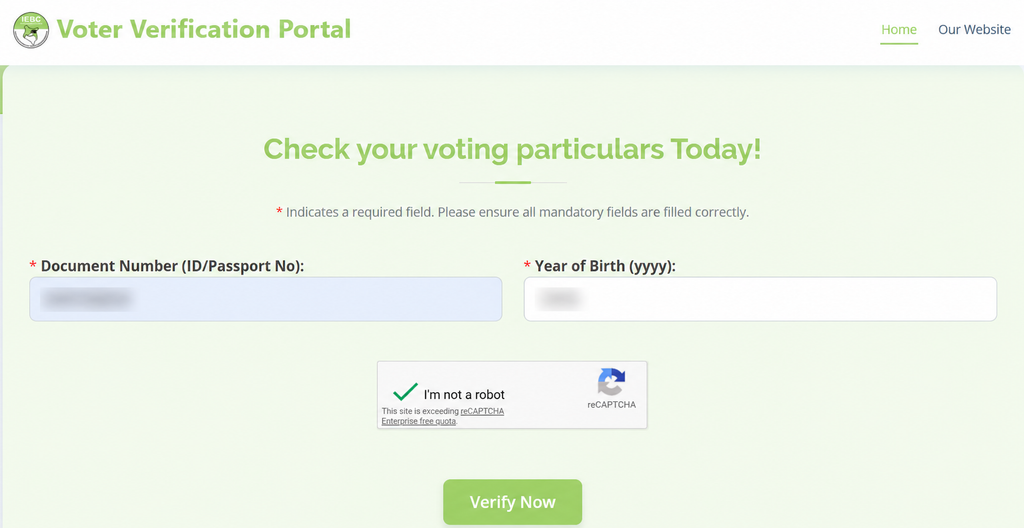
Step 2: Enter the identification details you used to register
Type your ID or passport number in the Document Number field. Then enter your year of birth in the next field. Use the same document you presented when you registered.
Step 3: Complete any security check and submit
If the page displays a security check, follow the instructions on IEBC’s site. Select Verify Now to submit the form. Do not try to bypass a security check or enter your identification details on another site.
Step 4: Review the result carefully
Make sure the result is yours. Check your name and the registration-area information the portal displays. Save or download a copy only if IEBC provides that option, and keep it somewhere private—especially if you are using a shared phone or computer.
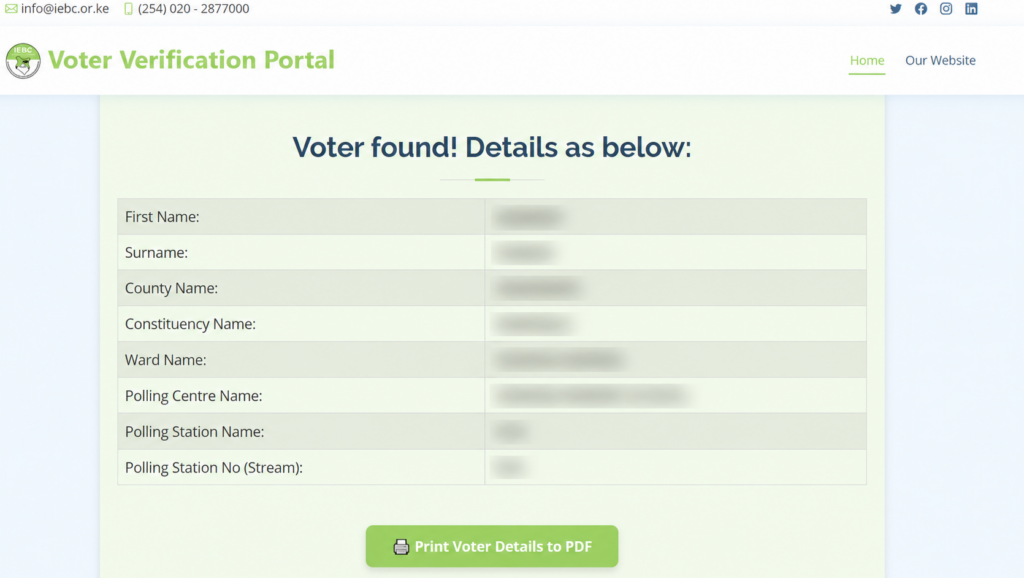
The details shown can depend on the stage of IEBC’s verification process. During a 2026 verification period, IEBC said the portal would show a voter’s registration centre, while it would allocate the polling station during an election.
That notice applied to that specific verification period. It means that a polling-station field missing at that time, by itself, did not prove that a voter was unregistered. Check IEBC’s latest notice on what the portal displays when you verify.
What if the portal does not find your record?
A missing result can be worrying, but check the details before concluding:
- Re-enter the ID or passport number you used when registering.
- Check that the year of birth is correct.
- If you registered recently, ask IEBC whether your record is still being processed.
- If the portal still does not show your record—or the details are wrong—contact IEBC or visit a constituency office with your original identification document. Ask an officer to check your record before applying to register again.
If you have moved and want to vote in a different area, ask IEBC about transferring your existing registration. A transfer is different from checking your status or registering for the first time. Confirm the current process and service location with IEBC before travelling.
Can I check my voter registration by SMS?
Use SMS only if IEBC has announced that the service is active and published the current number and instructions. Old codes or instructions may no longer work. The current online check is available through the IEBC Voter Verification Portal.
Frequently asked questions
How do I check my voter registration status online in Kenya in 2026?
Use the IEBC Voter Verification Portal. Enter the ID or passport number you used when registering, add your year of birth, complete any on-screen security check, and submit the form. Follow IEBC’s latest notice if the portal instructions or displayed details have changed.
Can I use my passport to check my voter details?
Yes. IEBC’s current portal accepts an ID or passport number, together with your year of birth.
Does checking my details register me to vote?
No. The portal checks an existing record. If you have never registered, follow our guide to registering as a voter in Kenya.
Can I change my registration area through the verification portal?
The verification portal is for checking your details. If you have moved, contact IEBC about the current voter-transfer process and where to apply. Do not assume that checking your record has moved your registration.
Is a missing polling-station name proof that I am not registered?
No. What the portal displays can vary by verification period. In a 2026 notice, IEBC said the portal would show registration centres during that period and that polling stations would be allocated during an election. Check the current IEBC notice before interpreting a missing field.
What if the IEBC portal is unavailable?
Try again later and check IEBC’s official website or notices for service updates. If you need help, contact IEBC through the details published on its official site or visit the relevant IEBC constituency office. Don’t enter your ID or passport details on an unofficial site, and don’t share them in public comments or social media posts.
Check early, and ask IEBC if something looks wrong
A quick check can help you catch a problem while there is still time to ask for help. Use the official portal, keep your identification details private, and contact IEBC if the result is missing or unfamiliar.
For more election guidance, visit the Vote Smart KE Voter Education Hub or follow national updates on our voter registration tracker.
This guide is based on the IEBC Voter Verification Portal and the Commission’s published notices. Portal fields, verification channels, and election deadlines may change; confirm the latest instructions directly with IEBC.